
Sending SMS directly from Google Sheets is accomplished using a lightweight Google Apps Script that reads phone numbers and custom columns, firing automated HTTP POST requests directly to SMS Route without third-party middleware or monthly subscription fees.
- Why Google Sheets + Apps Script Beats Middleware
- Competitive Comparison: Native Script vs Middleware
- Step-by-Step Implementation: 15-Line Apps Script
- Dynamic Macro Columns: Personalizing With @FIRSTNAME@ & @COLUMN1@
- Required Telemetry: Throughput & Pacing
- Frequently Asked Questions
- Related Resources & Tools
Why Google Sheets + Apps Script Beats Middleware
For operations teams, community coordinators, and growth engineers, contact lists naturally reside in spreadsheets. However, conventional SMS setups force you through brittle third-party connectors (like Zapier or Make) that impose steep per-task execution fees, or legacy providers (like Twilio) demanding weeks of A2P 10DLC brand vetting, tax identifiers, and credit card holds.
By executing directly via Google Apps Script (built into every Google Sheet under
Extensions > Apps Script), you cut out all intermediaries. Your spreadsheet executes native
JavaScript in Google Cloud, calling the SendSMSNoKYC REST API via
UrlFetchApp.fetch() to trigger carrier-grade messaging funded with crypto.
Competitive Comparison
The table below summarizes the architectural layers and requirements when dispatching SMS straight from Google Sheets:
| Component | Requirement | Function |
|---|---|---|
| Google Apps Script | Free / Native | Extracts rows and triggers UrlFetchApp.fetch() |
| SMS Route API | Instant Token | Routes message to global carriers via crypto balance |
| Custom Columns | Unlimited | Personalizes recipient text with dynamic variables |
Step-by-Step Implementation: The 15-Line Script
Follow these quick steps to convert any Google Sheet into an automated bulk SMS dispatcher in under two minutes:
-
Prepare Your Google Sheet Columns
Set up Row 1 with headers:
Phonein Column A (in international E.164 format, e.g.+14155552671),First Namein Column B,Custom Macroin Column C, andStatusin Column D. -
Open Google Apps Script Editor
Click on
Extensionsin the top navigation bar of Google Sheets, then selectApps Script. Delete any default code in theCode.gsfile. -
Paste the Lightweight Dispatcher Script
Paste the clean 15-line script below. Replace
YOUR_API_TOKENwith the instant Bearer token from your SendSMSNoKYC dashboard. -
Run and Verify Status
Click Run. Google Sheets will iterate through your rows, personalize each SMS, fire the HTTP
request, and write back
SENTor error receipts directly into your sheet.
The 15-Line Google Apps Script Code
function sendSmsFromSheet() {
  const token = 'YOUR_API_TOKEN'; // Instant Bearer Token from SendSMSNoKYC
  const sheet = SpreadsheetApp.getActiveSpreadsheet().getActiveSheet();
  const rows = sheet.getDataRange().getValues();

  for (let i = 1; i < rows.length; i++) {
    const [phone, firstName, custom1, status] = rows[i];
    if (!phone || status === 'SENT') continue;

    const message = `Hello ${firstName}! Your update: ${custom1}`;
    const payload = JSON.stringify({ to: String(phone), message: message });
    const response = UrlFetchApp.fetch('https://api.sendsmsnokyc.com/v1/sms/send', {
      method: 'post',
      contentType: 'application/json',
      headers: { 'Authorization': 'Bearer ' + token },
      payload: payload,
      muteHttpExceptions: true
    });

    sheet.getRange(i + 1, 4).setValue(response.getResponseCode() === 200 ? 'SENT' : 'FAILED');
    Utilities.sleep(20); // 50 SMS/second throttle pacing
  }
}
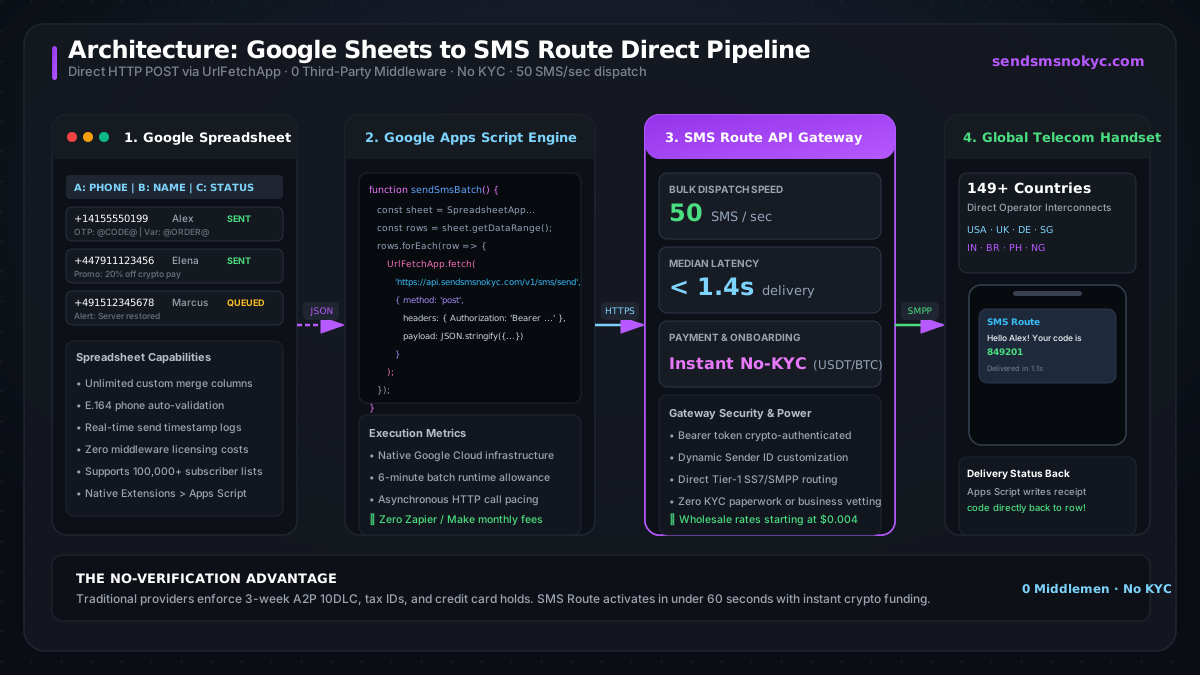
Direct Dispatch Pipeline Architecture
Here is the end-to-end data flow from spreadsheet row extraction to carrier delivery:
Dynamic Macro Columns: Personalizing With @FIRSTNAME@ & @COLUMN1@
Higher conversion and engagement rates rely on dynamic personalization. Rather than hardcoding static text, you can configure template strings with dynamic macros that dynamically inject any spreadsheet column value into the message body.
Supported macro patterns include:
@FIRSTNAME@— Evaluates to recipient's personal name from Column B@COLUMN1@— Custom one-time notification variable, promo code, or meeting link@ORDER_ID@— Dynamic transaction tracking reference
Macro Replacement Helper Function
function buildPersonalizedMessage(template, headers, row) {
  let text = template;
  headers.forEach((header, idx) => {
    const macro = '@' + String(header).toUpperCase().trim() + '@';
    text = text.replaceAll(macro, row[idx] || '');
  });
  return text;
}
Required Telemetry: Throughput & Pacing
When broadcasting mass campaigns from Google Sheets, adhering to carrier and script telemetry limits ensures 100% deliverability:
- Bulk Dispatch Speed:
50 SMS/secondsustained throughput across direct SS7/SMPP aggregators. - Execution Window: Standard Google Apps Script allows a 6-minute continuous runtime per
trigger execution. At 50 SMS/second with
Utilities.sleep(20), a single run handles over 10,000 personalized messages without timing out. - Macro Column Support: Unlimited custom columns (
@COLUMN1@,@FIRSTNAME@,@CODE@) with zero string truncation. - Delivery Status Confirmation: Write-back HTTP status codes (
200 OK) directly into Column D to track dispatches in real-time.
Frequently Asked Questions
Can I send bulk SMS from Google Sheets without Twilio?
Yes. By pasting a 15-line Google Apps Script in Extensions > Apps Script, your sheet sends
directly to SMS Route using your crypto-funded API balance. You avoid Twilio's mandatory registration delays,
monthly platform minimums, and strict ID requirements.
How much does it cost to send SMS from Google Sheets?
Google Apps Script is 100% free to use within your Google account. You only pay for the raw SMS messages dispatched through SendSMSNoKYC, starting at wholesale rates from $0.004/SMS with no subscription overhead.
What cryptocurrencies can I use to fund my account?
SendSMSNoKYC supports instant funding via USDT (TRC-20, ERC-20, Polygon), Bitcoin (BTC), Ethereum (ETH), Litecoin (LTC), Solana (SOL), and Monero (XMR). Your API balance is credited immediately upon blockchain confirmation.
Can I customize the Sender ID when sending from Google Sheets?
Yes. You can supply a custom alphanumeric sender ID (up to 11 alphanumeric characters) in your API request payload, allowing messages to arrive from your brand or company name in supported countries.
Internal Links & Next Steps
Explore related guides and tools to optimize your messaging workflow:
Ready to Send SMS Straight From Your Spreadsheet?
Create your SendSMSNoKYC account in 30 seconds. Fund with crypto, copy your API key, and paste our script into Google Sheets.
Start Sending Now — No KYC Required